Materials Calculator
Estimate the floss, skeins, and fabric a project needs.
The Materials Calculator is part of the Full Version.
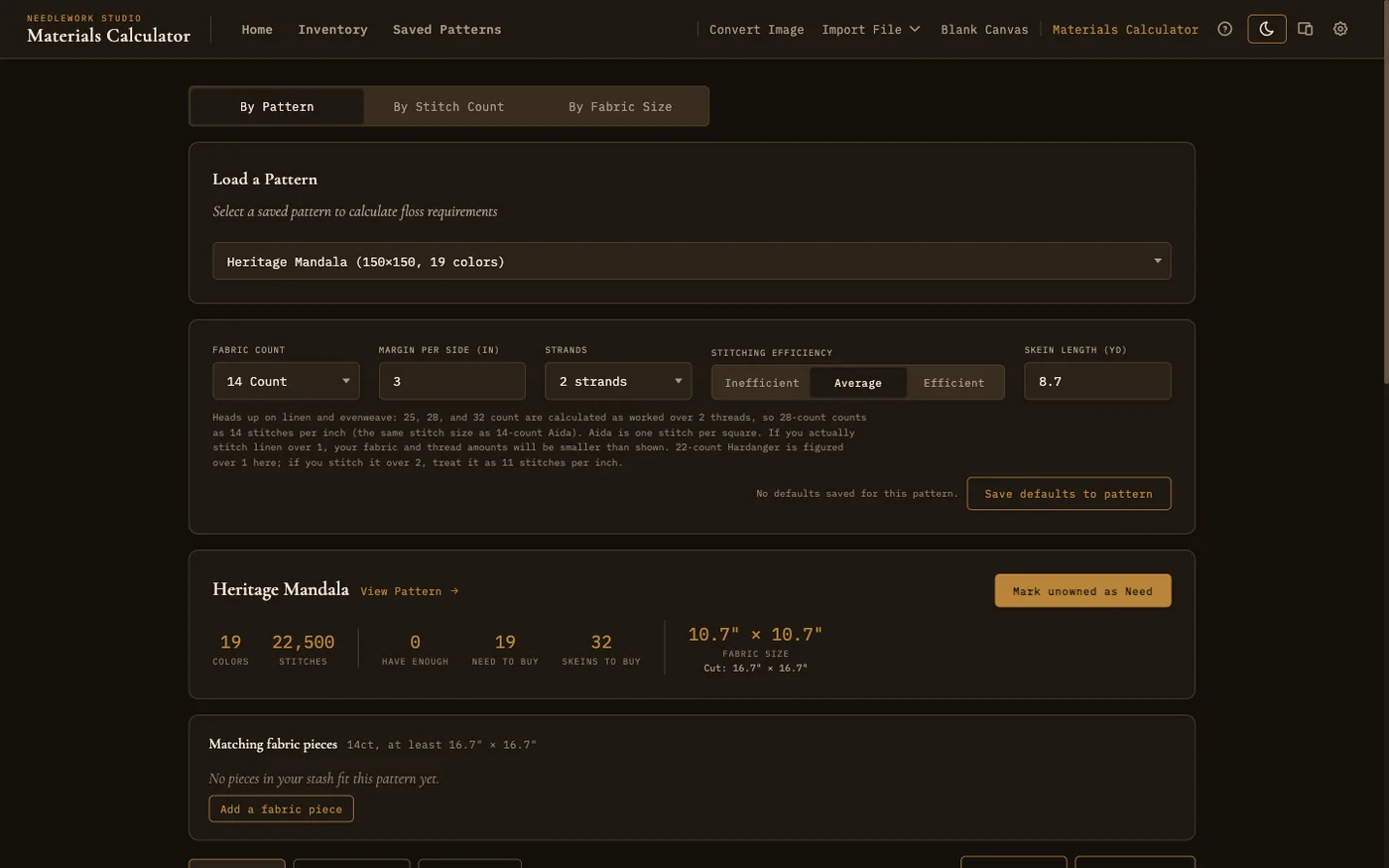
The materials calculator showing skein estimates and matching fabric pieces for a loaded pattern
Overview
The materials calculator estimates how much thread and fabric a project needs. It works out skein counts, the fabric cut size, and a per-color shopping list, and it can read your fabric inventory to tell you whether you already own a suitable piece. Open it from Materials Calculator in the Plan section of the navigation bar, or from Materials Calculator in a pattern card's menu on the Saved Patterns page. On the Free version the link does not appear.
Calculation Modes
Three tabs across the top choose how the calculator works:
- By Pattern - Load one of your saved patterns and the calculator reads its stitch count and colors directly. Most of this page describes this mode.
- By Stitch Count - A quick estimate for one color. Enter how many stitches of that color there are, plus strands, skein length, and stitching efficiency, and it shows how many skeins you need on each fabric count. Useful for a pattern you have not saved into Needlework Studio.
- By Fabric Size - Enter a pattern's width and height (in stitches, or in inches with the fabric count it was designed for) and a margin per side. It shows the finished design size and a suggested fabric size for each fabric count.
Calculator Settings
A row of settings shapes the estimate:
- Fabric count - The number of stitches per inch of the aida or evenweave you plan to use. A higher count makes a smaller finished piece.
- Strands - How many strands of floss you stitch with per cross, from 1 to 8.
- Stitching efficiency - Inefficient, Average, or Efficient. This accounts for how much thread is used per stitch, including the back of the work.
- Skein length - The usable length of one skein of floss, in yards. Standard DMC and Anchor skeins are 8.7 yards (8 meters), which is the default.
- Margin - The unstitched border to leave on each side of the design when cutting fabric, from 0 to 12 inches.
Results
The calculator shows a summary of the project: the number of colors and total stitches, how many colors you already have enough thread for, how many you still need to buy, and the total skeins to buy. It also gives the finished fabric size and the recommended cut size, which includes the margin you set.
Per-Color Breakdown
Below the summary, every color in the pattern is listed with its stitch count, the skeins it needs, how many you own, and how many to buy. You can type a new number in the Owned column and it updates your thread inventory too. That only works for colors that match a thread in your inventory; for other colors the box is grayed out. Tabs filter the list to All Colors, just the Shopping List of colors you are short on, or the colors you Have Enough of. A Mark unowned as Need button changes every color you do not own at all from Don't Own to Need in your thread inventory, in a single click, so it carries straight into your shopping list. Colors you own but are short on keep their status. A View Pattern link opens the loaded pattern in the viewer.
Matching Fabric Pieces
In By Pattern mode, the calculator checks your fabric inventory and lists any pieces whose count and dimensions fit the project, considering both orientations. Pieces you have flagged as Need to buy are shown too, with a badge, so you remember a suitable cut is already on your shopping list.
Saved Settings
Calculator settings can be saved per pattern with Save defaults to pattern. Once saved, loading that pattern again restores its fabric count, strands, skein length, and margin, so you do not have to re-enter them every time. Stitching efficiency is not saved per pattern: the calculator remembers your last choice for every pattern.
Exporting
Print List prints the shopping list and Download CSV saves a spreadsheet file. Both include only the colors you still need to buy, so they work as a shopping list to take to a craft store or to share.