Thread Inventory
Browse, search, and track your embroidery thread collection across DMC and Anchor brands.
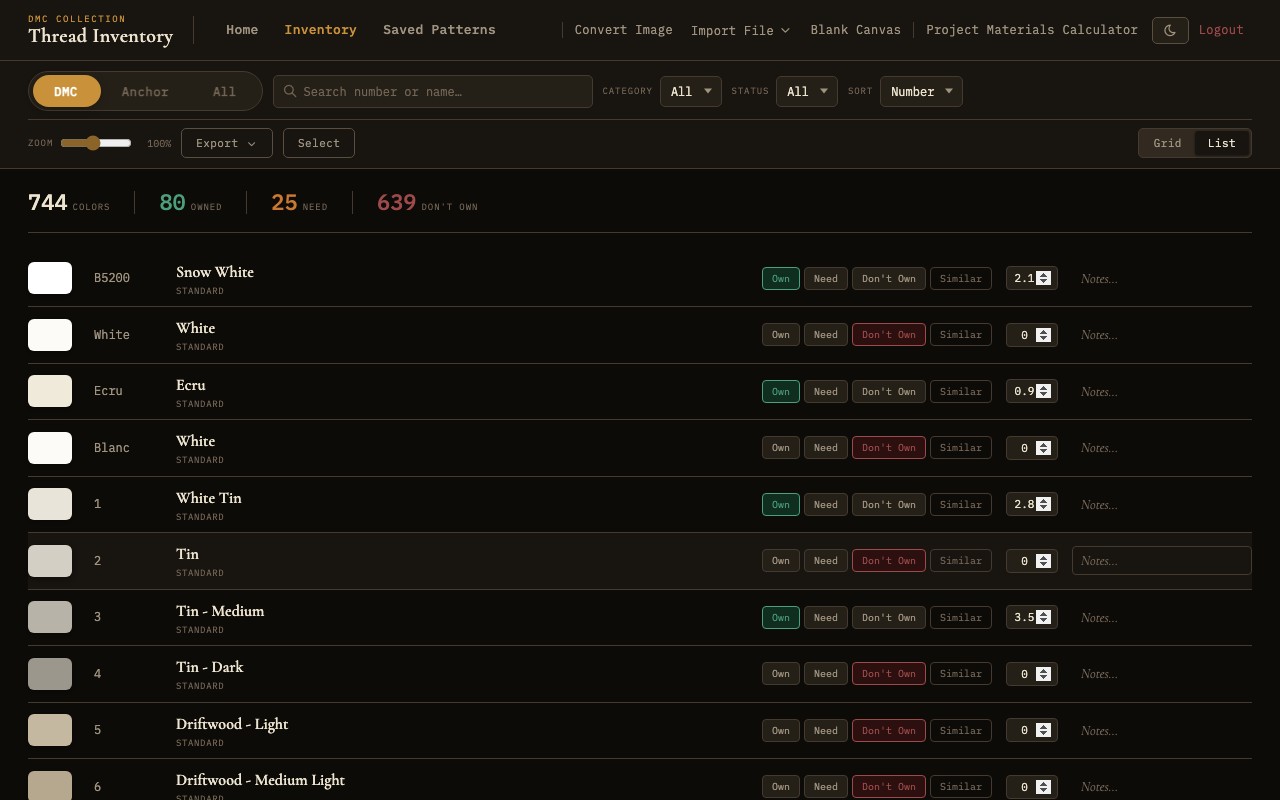
Thread inventory showing 744 DMC threads with search, filter, and status controls
Overview
The Thread Inventory ships with all 744 DMC stranded cotton colors and over 400 Anchor stranded cotton colors, each with accurate color swatches, official names, and thread numbers. Every color is ready to browse, search, and track from the moment you create your account.
The inventory serves two purposes: it acts as a reference catalog for all available threads, and it tracks which threads you personally own, need, or do not yet have. This information feeds into the materials calculator and helps you plan purchases for upcoming projects.
Searching
At the top of the inventory page, a search bar provides instant, real-time filtering as you type. You can search by:
- Thread number - Type a number like
310or3865to jump directly to that thread. Partial numbers work too: typing38will show all threads whose numbers start with 38. - Thread name - Type a color name like
ecru,cranberry, ornavyto find threads by their official color names. The search is case-insensitive and matches anywhere in the name.
Search results update instantly with each keystroke, so you can quickly narrow down the list without waiting for a page reload.
Filtering
Below the search bar, a set of filter controls lets you narrow the inventory by several criteria. Filters can be combined with each other and with the search bar for precise results.
Brand Filter
Toggle between DMC and Anchor to show only threads from that brand, or leave both active to see the entire inventory. This is useful when you work exclusively with one brand or want to compare equivalent colors across brands.
Thread Category
Filter threads by their category classification, such as standard stranded cotton, metallic threads, or other specialty types. This helps you focus on the thread type relevant to your current project.
Ownership Status
Three ownership status filters let you quickly view subsets of your collection:
- Own - Show only threads you have marked as owned. This gives you a quick overview of your current stash.
- Need - Show threads you have flagged as needed. Use this as a shopping list when visiting a craft store.
- Don't Own - Show threads with no ownership status set. These are threads you have not yet categorized.
Status Tracking
Each thread in the inventory has a set of tracking controls that let you record your relationship with that color.
Ownership Buttons
Three single-click buttons let you set the status of any thread:
- Own - Click to mark this thread as part of your collection. The thread card will display a visual indicator showing it is owned.
- Need - Click to flag this thread as something you need to purchase. Useful for building shopping lists.
- Don't Own - Click to explicitly mark that you do not own this thread. This is the default state for all threads.
Clicking a status button is a single-click action - there is no confirmation dialog. You can change the status at any time by clicking a different button.
Skein Quantity
For threads you own, you can track the number of skeins in your stash. Use the quantity field to record how many skeins of each color you have on hand. This information is used by the materials calculator to determine whether you need to purchase additional skeins for a new project.
Notes
Each thread has an optional free-text notes field where you can record any additional information. Common uses include noting the store where you purchased a thread, recording a dye lot number, or leaving a reminder about a color substitution you have used in the past.
Similar Colors
Needlework Studio includes a perceptual color matching feature powered by the CIEDE2000 color difference algorithm. When viewing any thread, you can find visually similar colors across the entire inventory.
CIEDE2000 is an advanced color distance formula that accounts for how the human eye perceives color differences. Unlike simpler RGB distance calculations, it produces results that align closely with what you would judge as "similar" by eye. This is particularly useful for:
- Finding substitutes - If your local store is out of a specific color, the similar colors feature can suggest close alternatives.
- Cross-brand matching - Find the closest Anchor equivalent to a DMC color, or vice versa.
- Building palettes - Discover colors that are close in hue but differ slightly in saturation or lightness, useful for shading and blending effects in pattern design.
Views
The inventory can be displayed in two different view modes, and you can switch between them at any time using the view toggle buttons.
Grid View
Displays threads as a grid of color swatch cards. Each card shows the thread color, number, and name. Grid view is ideal for visual browsing and quickly scanning large numbers of colors. It makes efficient use of screen space and is the default view mode.
List View
Displays threads as a vertical list with one thread per row. Each row shows the color swatch, thread number, name, ownership status, and quantity. List view provides more detail at a glance and is better suited for inventory management tasks like updating quantities or reviewing your ownership status across many threads.
Batch Selection
In both views, you can select multiple threads at once for batch operations. Use the selection checkboxes to choose threads, then apply an action to all selected items simultaneously. This is significantly faster than updating threads one at a time when you return from a shopping trip with several new colors.
Print-Friendly Thread List
Needlework Studio can generate a print-friendly version of your thread inventory, optimized for paper output. This is useful for creating a physical reference list to take with you when shopping for threads. The printed list includes thread numbers, names, color swatches (rendered as colored blocks), and ownership status. You can filter and sort the inventory before printing to include only the threads relevant to your needs - for example, printing only threads with a "Need" status to create a focused shopping list.